Site Checkup
English

Website vulnerability check app

A website vulnerability check
on your phone.

Just enter a URL and tap a button. Site Checkup looks through your public pages and finds known vulnerabilities from the software and versions your site uses. It explains what could happen if you leave them unfixed, exactly how to fix them, and even drafts a request for your web vendor.

  • Free check available
  • Full report via in-app purchase
  • No simulated attacks

Results & report

Risks and fixes at a glance

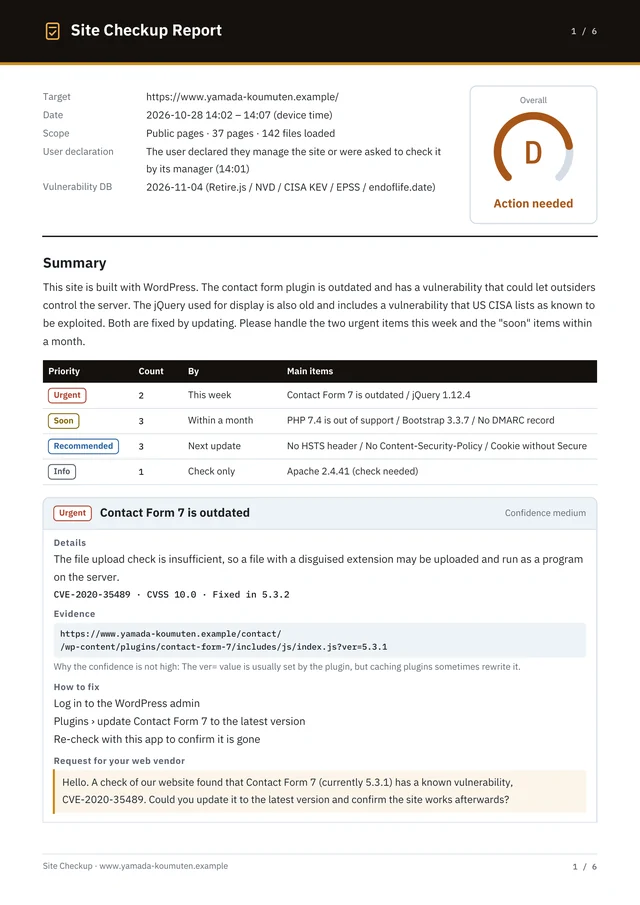
This is a sample of what the full report shows. Each finding comes with a priority and evidence, ready to hand to your web vendor.

Grade A–E and priority

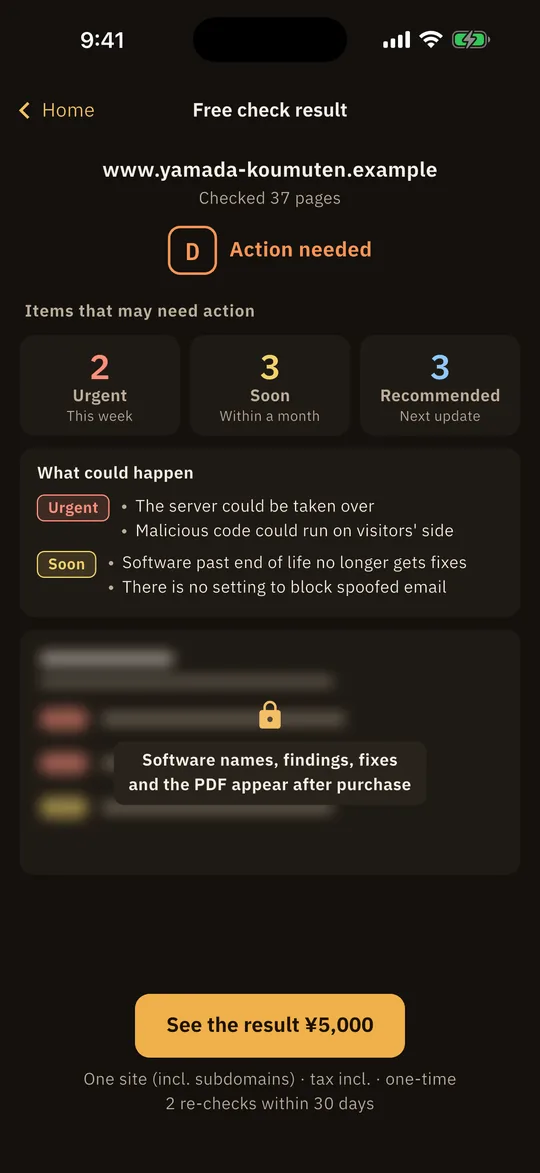
An overall grade for the site and the number of findings at each priority come first. Findings are listed from highest to lowest priority.

Evidence and how to fix

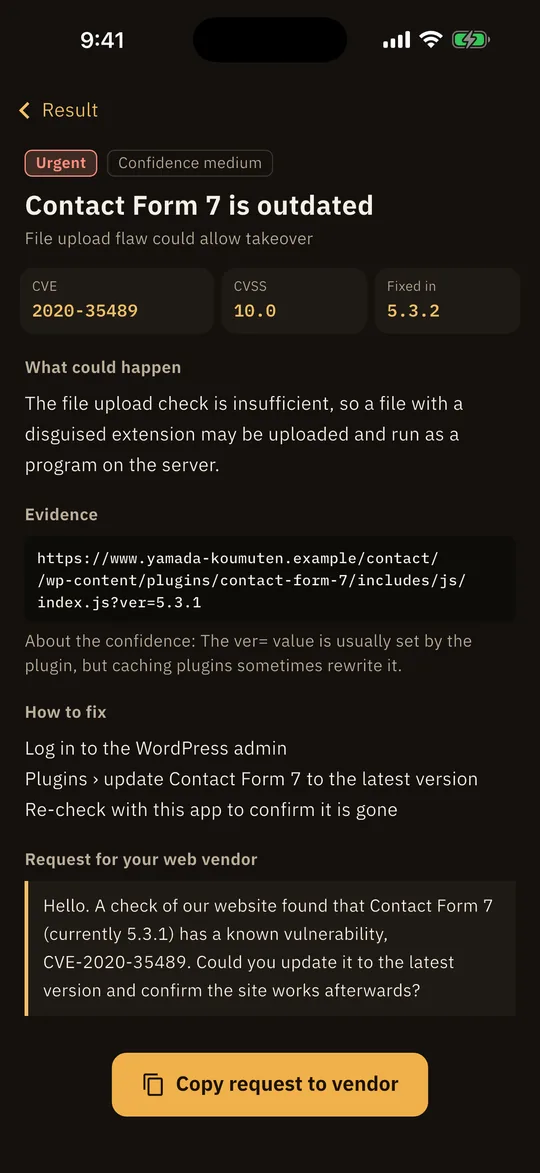
For each finding: what could happen, the URL of the file used as evidence, and how to fix it.

Finding details screen. Contact Form 7 is outdated, Urgent. CVE-2020-35489, CVSS 10.0. Shows what could happen, the URL of the evidence file, how to fix it, and the request for the web vendor

Request for your web vendor

Copy it with one tap from the finding details screen.

Hello. A vulnerability check found that the Contact Form 7 plugin on our website (currently 5.3.1) has a known vulnerability, CVE-2020-35489. Could you please update it to the latest version and confirm that the site works correctly afterward? Thank you.

PDF report (11 languages)

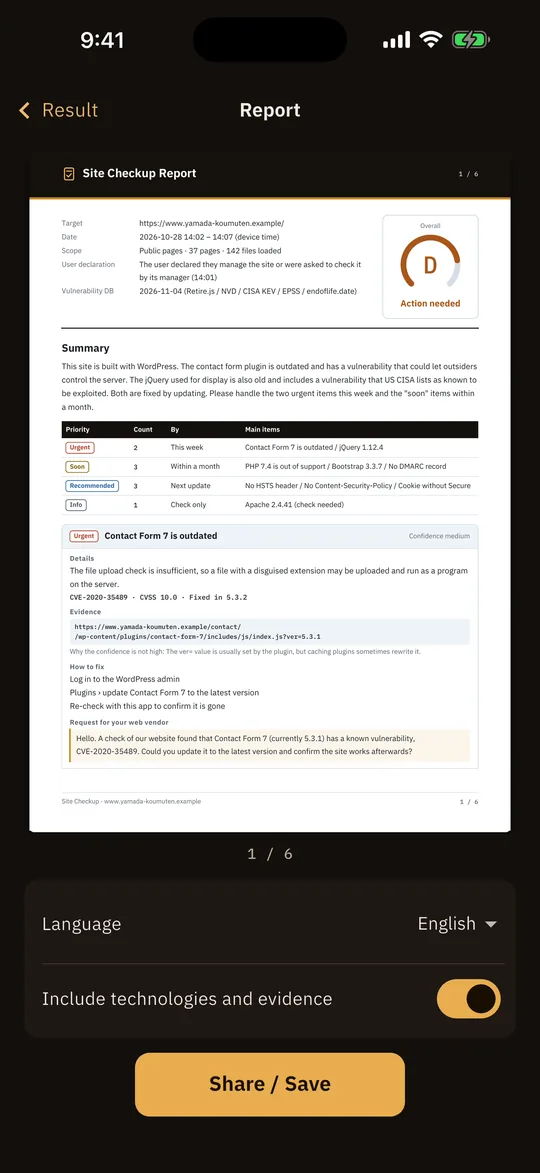
The grade, summary, findings, fixes and vendor request in one file you can share with your team or web vendor.

Page 1 of the PDF report: target, date and time of the check, scope, overall grade D, summary, a table of findings by priority, and the Contact Form 7 finding with the request for the web vendor

The screens and PDF are samples from checking a fictitious site (.example).

What we check

What it checks

From your pages, the files they load and the server responses, Site Checkup identifies the software you use, its versions and its settings.

What it checks against

Known vulnerabilities (CVE)
8,700+
WordPress plugins
799types
JavaScript libraries
75types
End-of-life dates
43products

Public data used for matching (as of November 4, 2026)Retire.jsNVDCISA KEVEPSSendoflife.dateWPVulnerability

Known vulnerabilities

Known vulnerabilities

Site Checkup reads the versions of WordPress core, plugins and themes, and of JavaScript libraries, and checks them against more than 8,700 known vulnerabilities (CVE).

  • WordPress
  • 799 plugins
  • 59 themes
  • jQuery
  • Bootstrap
  • Vue.js
  • React
  • Lodash
  • Plus 75 JavaScript libraries

End of life

End of life

Checks the support dates of 43 products to see whether you are still running software that no longer gets security fixes.

  • PHP
  • nginx
  • Apache
  • MySQL
  • OpenSSL
  • Tomcat
  • Drupal
  • Laravel
  • And more

TLS

Encryption

Redirects to HTTPS, TLS certificate expiry, and images or scripts loaded over http.

Headers

Security headers

Settings such as CSP and X-Frame-Options that turn on protections in the browser.

Email

Spoofed email protection

SPF and DMARC settings that block fake emails sent in your domain’s name.

Cookie / Form

Cookies and forms

Cookie attributes, where forms send data, and tamper protection for external scripts (SRI).

How it works

Enter a URL and tap a button

No account needed. The check runs on your phone.

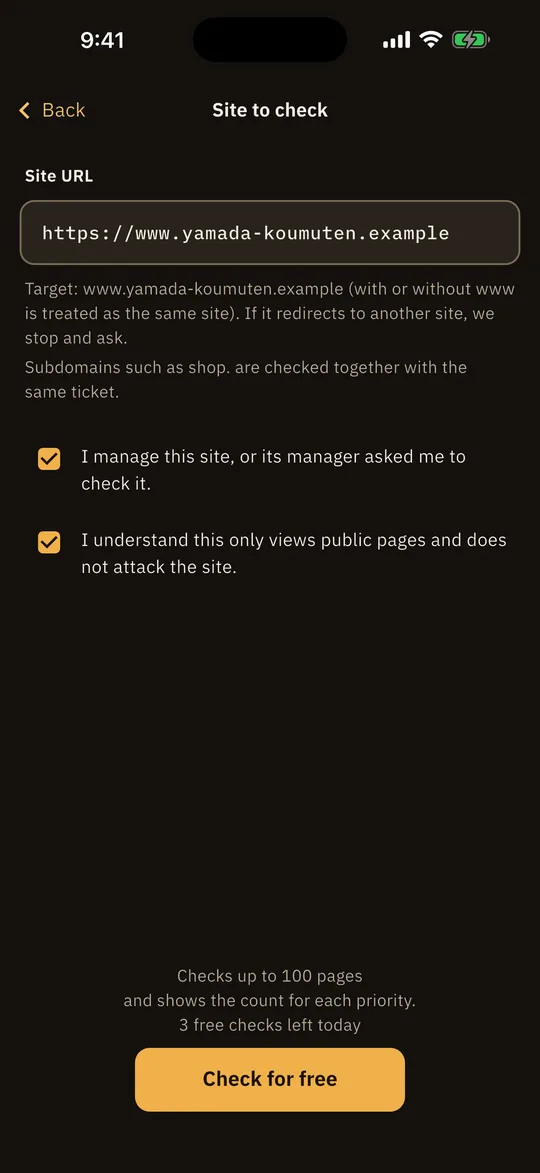
  1. Screen for entering the site to check. Enter the site URL, confirm 2 items such as being the administrator, and tap the free check button
    STEP 1

    Enter a URL

    Enter the URL of the site to check, and confirm that it is a site you manage.

  2. Free check result screen: grade D (Action needed), 2 Urgent, 3 Soon and 3 Recommended findings, and what could happen
    STEP 2

    Run a free check

    Checks up to 100 pages and shows the grade (A–E), the number of Urgent, Soon and Recommended findings, and what could happen.

  3. Report screen: a preview of the first page of the PDF (overall grade D, summary and counts by priority), the language picker and the Share / Save button
    STEP 3

    Read the full report right away

    After purchase, you can see the software names, findings with evidence, how to fix them, the request for your web vendor, and the PDF.

Our policy

No attacks. No findings sent to us.

  • No attacks

    Site Checkup only uses GET and HEAD, the same as viewing public pages in a browser, and visits up to 100 pages, 3 levels deep. It does not submit forms or send anything that counts as an attack. It also follows robots.txt.

  • Checks run on your phone

    The vulnerability data is built into the app, and matching takes place on your phone. The contents of check results, such as the list of findings, are never sent to our servers. The usage information sent to improve the app (such as the host name of the site checked and the “Overall” result) is described in our Privacy Policy.

  • Only sites you manage

    Before each check, you confirm that you manage the site or have been asked to check it by the person who does. Subdomains of the same domain are included in the same check.

  • “No findings” does not mean your site is secure

    Site Checkup cannot check software that hides its version or screens that are not public. It is not a substitute for a vulnerability assessment by professionals.

Pricing

Check for free. Get the full report if you need it.

No monthly subscription. Payment is by in-app purchase.

  • Site Checkup (this app)Free + in-app purchaseA quick check of known vulnerabilities and settings from your public pages
  • Tool-based check by a security firm (example)From about ¥120,000One site scanned with an assessment tool
  • Tool + manual assessment (example)From about ¥300,000A tool scan plus manual checks by an engineer
  • Full web application assessment (example)From about ¥1.5 millionTools and manual testing combined, covering about 40 pages in depth

Security firm prices are examples listed on Japanese providers’ official websites (as of November 6, 2026, tax included): SAKURA internet “Website Scouter,” ¥121,000 per check; SOMPO CYBER SECURITY “Web Application Assessment Light Plan,” ¥297,000; Cyber Security Cloud “Standard Web Application Assessment,” from ¥1,350,000 (excluding tax, for 40 pages; ¥1,485,000 including tax). Site Checkup is a simple check based on public information and is not a substitute for an assessment by professionals.

Free check

Free

  • Checks up to 100 pages
  • Grade (A–E), number of findings by priority, and what could happen
  • Up to 3 times a day

FAQ

FAQ

For other questions, see Support.

Is it really free?

The free check looks at up to 100 pages and shows the grade (A–E), the number of findings at each priority and what could happen. To see the software names, the details of each finding, how to fix them and the PDF, buy the full report (in-app purchase, one-time per domain). You can run up to 3 free checks a day.

Can it check subdomains (such as shop.)?

Yes. Subdomains of the same domain as the site you enter are included in the same check. You pay once per domain (subdomains included) by in-app purchase, and each check covers up to 100 pages in total, subdomains included.

Can I check other companies’ sites?

You can only check sites you manage yourself, or sites the administrator has asked you to check.

Will it put a load on my site?

Pages are fetched one at a time, at a fixed interval of one request per second. If errors occur 5 times in a row, the crawl stops. For details, see About our crawler.

If the grade is A, is my site secure?

Not necessarily. The grade reflects only what can be seen from outside. Site Checkup cannot check software that hides its version or screens that are not public.

Can it replace a professional vulnerability assessment?

No. It is a simple check based on public information. “No findings” does not mean your site is secure.

Can you recommend a company to fix the issues?

If you would like an introduction to one of our partner cybersecurity companies, contact site-diagnosis@teractor.co.jp. The app never automatically sends the contents of your results, such as the list of findings, to the partner or to us.

Start with a free check

Site Checkup · Website Vulnerability Check

Coming soonApp StoreComing soonGoogle Play